How to Manage Repositories and Upstream Mirrors
Enable and disable repositories, configure anonymous access, browse cached packages, view per-repository traffic, and set up client connection guides.
Overview
Repositories in Chainsaw represent upstream package registries that the proxy mirrors. Each repository is a pull-through cache for a specific ecosystem — when a package is requested, Chainsaw fetches it from upstream, caches it locally, and serves it to the client. This tutorial covers managing these repositories.
Prerequisites
- Admin or Owner role in Chainsaw
- Understanding of which package ecosystems your organization uses
Step 1: View All Repositories
Navigate to Repositories in the sidebar. You’ll see a list of all configured repositories.
Each repository card shows:
| Field | Description |
|---|---|
| Name | Repository identifier (e.g., npmjs, pypi) |
| Format | Package ecosystem (npm, pip, maven, etc.) |
| Upstream | The source registry URL |
| Status | Enabled or disabled |
| Packages | Number of cached packages |
| Traffic | Request count in the selected time range |
Step 2: Enable or Disable Repositories
Toggle repositories on or off based on which ecosystems your organization needs:
- Click on a repository
- Toggle the Enabled switch
- Disabled repositories reject all requests
Step 3: Configure Anonymous Access
By default, repositories require client credentials. You can enable anonymous access for specific repositories if needed (e.g., for open development environments):
- Click on the repository
- Toggle Anonymous Access
- When enabled, requests without credentials are accepted
Step 4: Browse Cached Packages
Click into a repository to see the packages that have been cached:
The package browser shows:
- Package name and versions
- Last access time
- Download count
- Vulnerability status (if scanned)
Step 5: View Per-Repository Traffic
Each repository has a Traffic tab showing request metrics:
- Total requests over time
- Cache hit ratio
- Top requested packages
- Blocked requests
This helps you understand:
- Which ecosystems generate the most traffic
- How effective the cache is per registry
- Which packages are most frequently requested
Step 6: View Client Setup Guides
Each repository page includes a Setup Guide section with copy-paste instructions for configuring package managers to use that specific repository.
Share these guides with your development teams to simplify onboarding.
Step 7: Understand Negative Caching
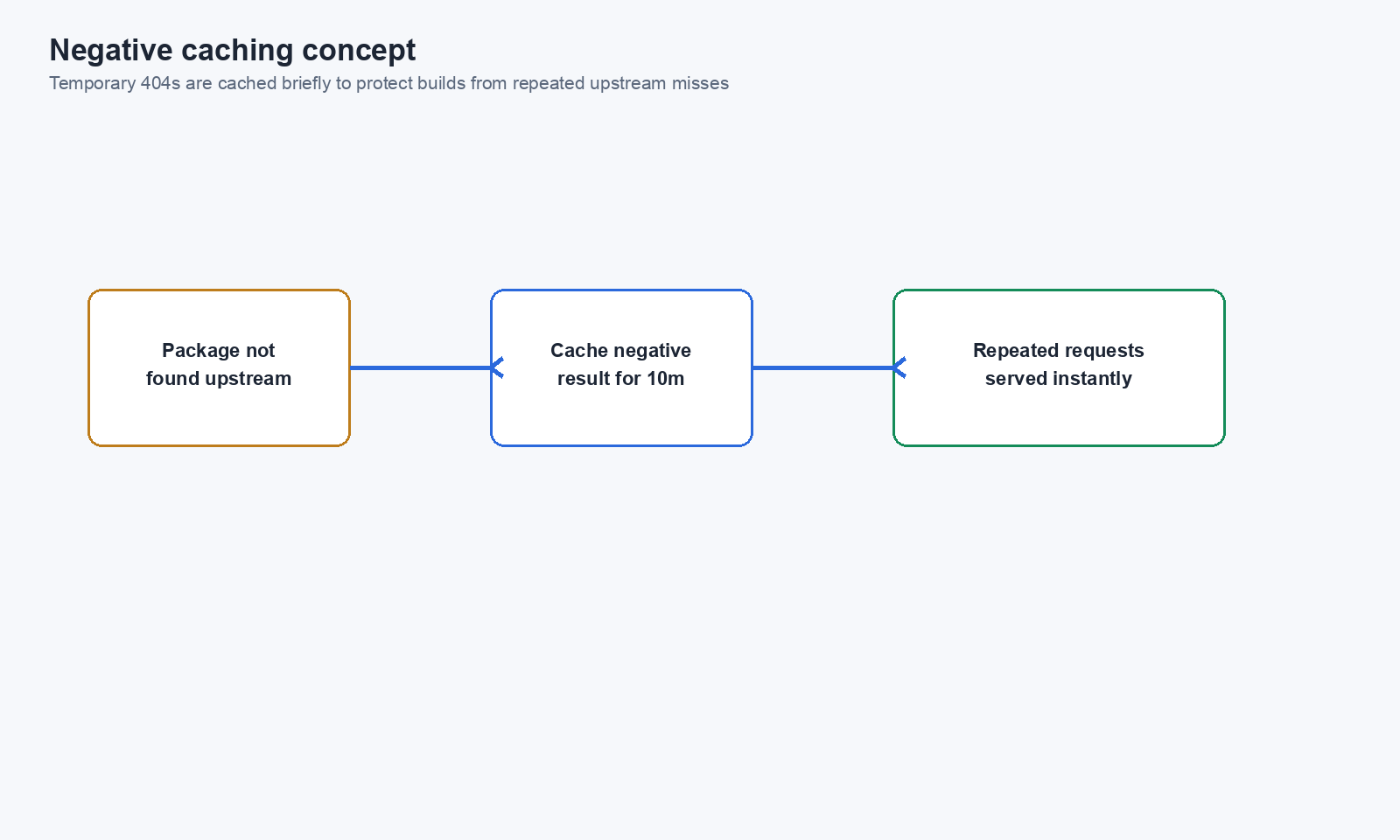
Chainsaw uses negative caching to prevent repeated 404 requests to upstream registries. When an upstream returns a 404:
- Chainsaw caches the negative result
- Subsequent requests for the same package return 404 immediately
- The cache expires after a configurable time
This reduces load on upstream registries and improves response times for packages that don’t exist.
Step 8: Format-Aware URL Rewriting
For some ecosystems (PyPI, Composer), upstream responses contain absolute URLs that point back to the original registry. Chainsaw automatically rewrites these URLs to point through the proxy, ensuring all subsequent requests stay on the Chainsaw path.
Supported Repository Formats
| Format | Upstream Default | Repository Path |
|---|---|---|
| npm | registry.npmjs.org | /repository/@default/npmjs/ |
| PyPI | pypi.org | /repository/@default/pypi/simple/ |
| Maven | repo1.maven.org | /repository/@default/maven-central/ |
| NuGet | api.nuget.org | /repository/@default/nuget-official/v3/index.json |
| Cargo | crates.io | /repository/@default/crates-io/ |
| Composer | packagist.org | /repository/@default/packagist/ |
| Go | proxy.golang.org | /repository/@default/gomod/ |
| Docker | registry-1.docker.io | /repository/@default/docker-hub/ |
| RubyGems | rubygems.org | /repository/@default/rubygems-official/ |
| APT | varies | /repository/@default/apt-main/ |
| Yum/DNF | varies | /repository/@default/yum-baseos/ |
| Hugging Face | huggingface.co | /repository/@default/huggingface/ |
Next Steps
- How to Configure Your Package Manager to Use Chainsaw — Per-ecosystem configuration
- How to Manage Cache and Optimize Build Performance — Cache management and purging
- How to Create and Manage Client Credentials — Credential management for repository access