How to Use Billy MCP Tools for Violation Triage
Run inventory queries, simulate patches, and route violations to owners — all from a Billy chat. Walks through the four tool calls Billy can make on your behalf and the approval flow that keeps you in control.
What’s New Here
Tutorial 14 covered Billy’s read-only SQL queries and policy approval cards. This tutorial covers the MCP tool surface Billy now has access to:
| Tool | What Billy can do |
|---|---|
chainsaw_query_inventory | Pivot the inventory by package / client / ecosystem to answer “where is this?” |
chainsaw_query_affected_packages | Walk the dependsOn graph for a CVE and find every transitively-affected package |
chainsaw_simulate_patch | Preview the impact of a candidate upgrade — {cleared_cves, unblocked_transitive_count, related_pins} |
route_violation_to_owner | Resolve CODEOWNERS for a violation and dispatch the notification |
The first three are read-only; Billy can call them as part of answering your question without an approval card. The fourth is a side-effecting tool — it triggers a real outbound notification — and always goes through Billy’s approval card before firing.
Prerequisites
- Billy enabled and tutorial 14 walked through.
- Outbound notification destinations configured for at least one channel (Slack / Teams / PagerDuty / email) — see tutorial 59.
- A populated CODEOWNERS file at
/admin/org-settings/ownership— see tutorial 61.
Step 1: Verify Billy Has the Tools
In a Billy chat, ask:
What MCP tools do you have access to?
Billy lists the four tools and a one-line description of each. If route_violation_to_owner is missing, your CODEOWNERS map is empty — Billy hides the tool until ownership is configured.
Step 2: Read-Only Triage Workflow
Imagine a new CVE just dropped: GHSA-jr5f-v2jv-69x6 in a popular npm package.
You: A new GHSA just dropped: GHSA-jr5f-v2jv-69x6. What's our exposure?

Billy: [calls chainsaw_query_affected_packages]
      We have 6 direct dependencies and 12 transitive dependencies pulling in
      the affected package, across 4 client credentials. The biggest exposure
      is in the frontend-build pipeline (8 packages affected).

You: What would the cleanest patch look like?

Billy: [calls chainsaw_simulate_patch for several upgrade candidates]
      Upgrading the affected library from 6.2.1 → 6.2.4 clears all 18
      direct + transitive references with no breaking changes.
      The simulator also unblocks 3 other CVEs that were transitively pinned.
These tool calls happen automatically. Billy decides which tool to use based on your question and feeds the JSON results back into its response.
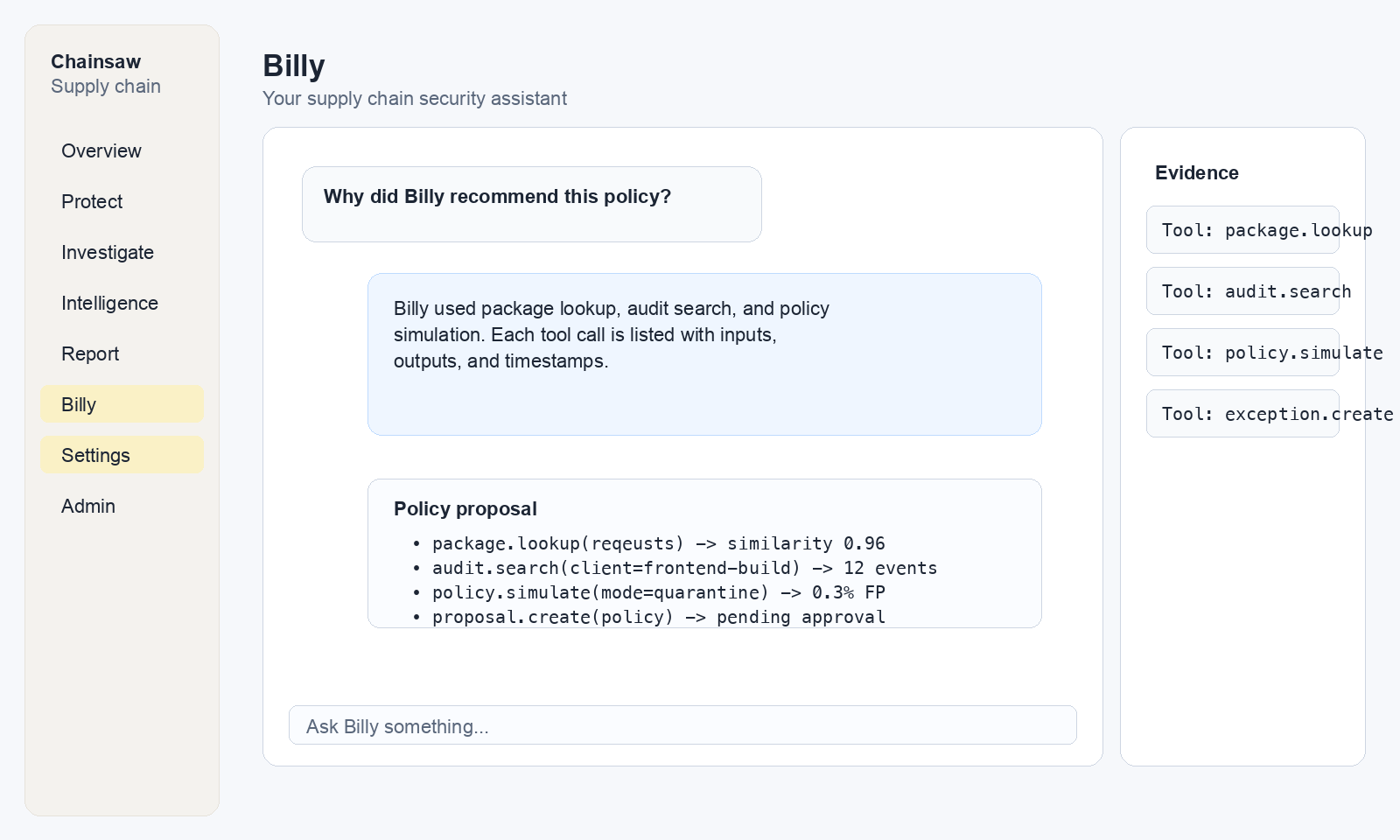
You can expand each tool-call card to see the JSON request and response. This is the trust mechanism — Billy never paraphrases data without showing you the raw call.
Step 3: Side-Effect Workflow with Approval
For route_violation_to_owner, Billy always asks first:
You: For each KEV-pinned CVE in our supply chain, notify the owning team.

Billy: I found 4 packages with KEV-pinned CVEs. I'd like to dispatch
       notifications via route_violation_to_owner for each one. Here's
       what each notification will say and who it'll go to:

       [shows approval card with 4 dispatches]

       Approve all 4? [Approve all] [Approve individually] [Cancel]
The approval card lists:
- The exact JSON payload for each dispatch
- The resolved CODEOWNERS team for each violation
- The destination channel (Slack
#sec-ops, PagerDuty schedule X, etc.) - A “dry run” preview of the rendered message
You approve the batch, individual rows, or cancel. Nothing dispatches without your click.
route_violation_to_owner. There is no Billy “trust mode” that suppresses it — even an org-admin asking Billy “send these now” still sees the card. This is by design: an LLM that thinks the user authorized a dispatch is a bug; an LLM that shows the user what it’s about to dispatch is a tool.Step 4: Action Log
Every approved (or rejected) action is recorded in Billy → Action Log. The log shows:
| Column | Meaning |
|---|---|
| Time | When the action card was generated |
| Tool | Which tool was being invoked (only side-effect tools are logged here) |
| Approver | Who clicked Approve |
| Outcome | approved, rejected, expired (the card was idle for 24h) |
| Diff | The exact payload that fired |
For compliance audits, this is the surface to point an auditor at — every Billy-initiated change goes through this log.
Step 5: Common Triage Patterns
Inventory drill-down
You: Which clients are still using lodash 4.17.20?

Billy: [chainsaw_query_inventory]
      Three clients: ci-frontend (8 manifests), ci-backend (2), local-devs (1).
      Two transitive references — both via the same outdated dependency.
Patch impact preview
You: We're thinking of pinning all our internal builds to npm package age >= 30.
     What would break?

Billy: [chainsaw_query_inventory + chainsaw_simulate_patch in a loop]
      28 packages currently used would fail the gate. 19 of them have
      ≥30-day-old versions available without breaking changes.
      The remaining 9 are blockers — here are their owners …
CVE-to-owner pipeline
You: For every CVSS ≥ 8 vulnerability in our inventory, queue a notification
     to the owning team with the cleanest patch.

Billy: [orchestrates query_affected_packages, simulate_patch, route_violation_to_owner]
      Found 12 violations meeting the threshold. Approval card with 12 rows.
Step 6: What Billy Won’t Do
The tool surface is intentionally narrow. Billy cannot:
- Modify or delete inventory entries (no
*_writetool exists) - Create or delete policies (the policy-creation flow is the existing approval card from tutorial 14, not a tool)
- Bypass the CODEOWNERS resolver (no way to override the routing in the tool params)
- Dispatch notifications outside your configured destination map
Anything outside this set requires you to act directly via the dashboard or API.
Verification
- Ask Billy “what MCP tools do you have?” — four tools listed.
- Ask a read-only triage question — Billy shows expandable tool-call cards.
- Ask a side-effect question — Billy returns an approval card before firing anything.
- Reject the card — confirm no notification fires (check the destination channel).
- Approve a single row — confirm exactly that one notification fires, recorded in the action log.
Related Topics
- How to Use Billy to Investigate and Draft Policies — Billy’s read-only SQL surface (predates the MCP tools).
- How to Connect Claude / Cursor / GPT via MCP — the same tools available to your own agents outside the dashboard.
- How to Route Violations to Owners with ActionNotifyOwner — the policy-engine path to the same dispatch primitive.